Breaking: “Nano Banana” button added to Google Search mobile App Today
Quick Summary: What’s New
Breaking: Google adds the “Nano Banana” button to Search on mobile. The Google app is now showing a yellow banana icon as a one-tap shortcut into Nano Banana image creation and AI photo editing. The button routes users into Google Lens “Create” mode and, for some accounts, AI Mode image tools, making “search” feel more like an AI workspace than a results page.
Early rollout signals point to a staged release (feature flags, Labs eligibility, account gating), which explains why some users see the banana button and others do not, even on the same device model. Reported issues include the button disappearing after updates, country or language mismatches, and “Create images” tools showing in AI Mode while the home-screen banana chip is missing. In practice, this is normal for Google Search experiments, especially when AI features are capacity-limited.
If you are tracking SEO, AEO, and GEO: this is a meaningful UX shift. Google is pushing generative image workflows inside Search, which increases the importance of entity clarity, structured data, and brand recall, because users may “create” directly from Search rather than click through to publisher pages.
Google has started surfacing a yellow banana icon in the Google app (mobile) as a shortcut into Nano Banana image creation/editing, mainly via Google Lens “Create” mode and AI Mode.
The first official rollout window was 13 October 2025, initially English, U.S. and India.
Availability is uneven: some users need Search Labs / AI Mode opt-in, correct account age settings (18+), supported countries/languages, and the latest app build.
Reported “bugs” are mostly feature gating and experimentation: button missing, region mismatch, language mismatch, usage limits, and rollout variability.
Below is the UI people are reacting to today: the Google app search bar, with quick actions including AI Mode and a banana icon shortcut.
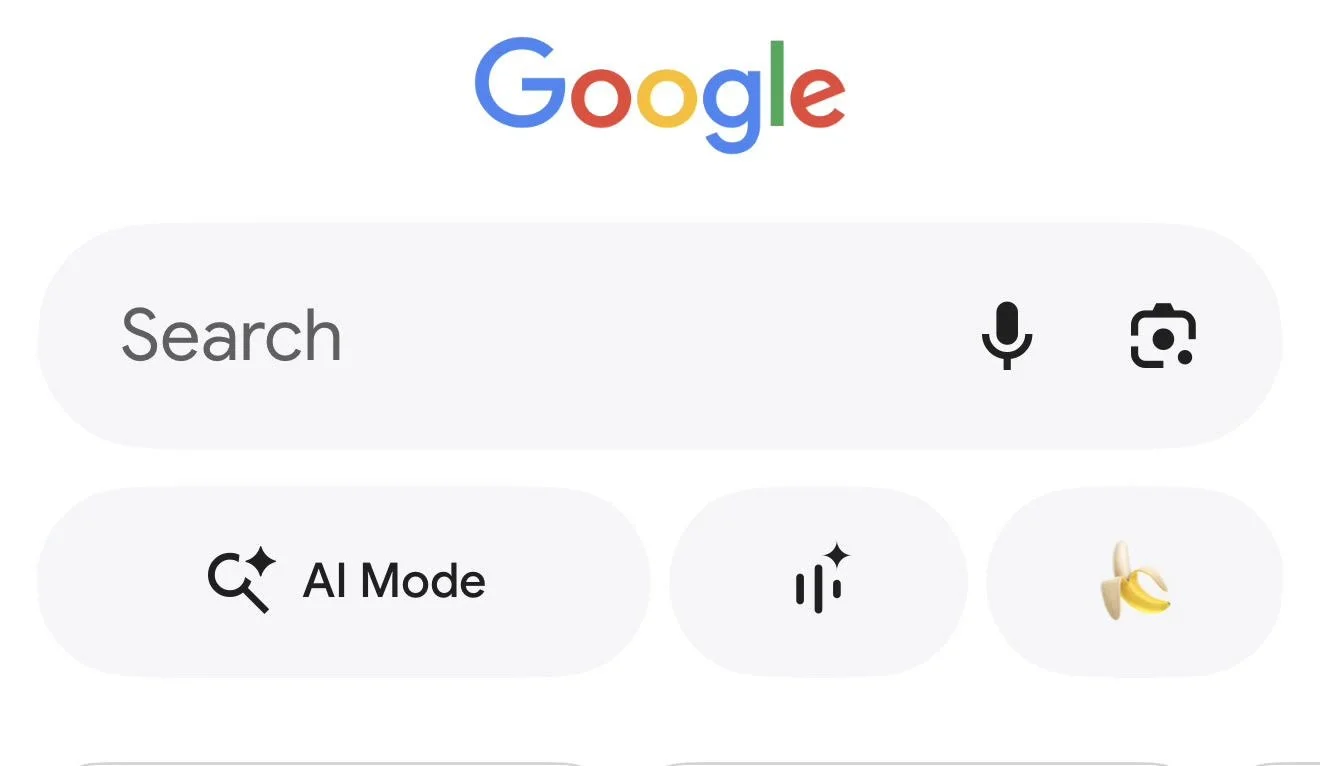
New Nano banana Gen AI images button in new Google Search App UX
What is the “Nano Banana” button in Google Search?
The “Nano Banana” button is Google’s yellow banana shortcut that takes you into AI image creation and editing inside the Google app, primarily through Google Lens “Create” mode and sometimes via AI Mode. It’s essentially a one-tap entry point to Google’s Nano Banana image workflow embedded into Search surfaces.
Google’s own language frames it as “rolling out our latest image editing model in Search… through Lens and AI Mode”, with the banana acting as the visual affordance for “Create”.
When did the banana button start showing in the Google Search app?
The first official public rollout date is 13 October 2025, when Google announced Nano Banana editing in Search via Google Lens and AI Mode. Independent spotting and screenshots appeared slightly earlier (around 11 October 2025) tied to AI Mode Search Labs accounts, which is typical of staged Google rollouts.
Timeline (evidence-led)
11 Oct 2025 (observed): Reports show Nano Banana appearing for some users inside AI Mode and Lens, often requiring AI Mode Search Lab opt-in.
28/01/2026: Google rolling out the button on the mobile search app to more users.
Which countries can see it, and why the rollout feels inconsistent
At launch, Google explicitly said image editing in Lens and AI Mode started rolling out in English in the U.S. and India. Broader AI Mode image creation availability depends on country, language, account age (18+), and sometimes subscription tier, which creates the “it’s here, no it’s gone” experience for users in other regions.
What Google officially stated at launch
Google’s product post is clear: English, U.S. and India first, with more countries/languages “coming soon”.
Countries where AI Mode image creation is supported
Google’s Search Help documentation lists supported countries for AI Mode image creation (not identical to “banana icon appears on your home screen”, but it’s the best official proxy for where the feature should work end-to-end):
Argentina, Bangladesh, Brazil, Canada, Chile, Colombia, India, Indonesia, Japan, Mexico, Pakistan, Peru, South Africa, South Korea, United States, Venezuela.
Important nuance: button visibility vs capability
The banana can appear as:
A Lens Create mode marker (the yellow banana inside Lens).
An AI Mode tool (“Create images” with a banana emoji in some UIs).
A home-surface shortcut chip (as in your screenshot). This specific placement is often experiment/UI-variant driven, so two users in the same country can see different layouts.
Known Bug
Some users reported that the button is indeed showing a new interface to take photos, or to upload photos but when the user write a prompt to amend they get thrown back to AI Mode that only gives instructions on how to use nano banana instead of creating the image amends.
The most common failure modes
Not in Search Labs / AI Mode: Some sightings are tied to AI Mode Search Labs enrolment.
Country/language mismatch: Image creation availability is country and language scoped.
Account constraints (18+ / personal Google account): Google states requirements like being 18+ and signed in to a personal account you manage.
Rollout variance: Google’s support threads repeatedly show “it’s limited testing, update app, clear cache, wait”, classic staged rollout guidance.
Usage limits / capacity throttling: Limits can change based on capacity and demand, and that can feel like “the feature broke”.
How to check if you have Nano Banana on your mobile app?
Open the Google app on mobile, tap Lens, then look for Create mode (yellow banana). If you have AI Mode, open AI Mode and look for image tools (“Create images”). If it’s missing, confirm you’re in a supported country/language, signed in, 18+, updated the app, and enrolled in Labs where required.
Google’s own steps for Lens are explicit: open Lens, tap Create mode, then prompt edits.
Why Google is doing this
The banana button is less about “fun UI” and more about keeping users inside Google surfaces for creative tasks that used to happen in standalone AI apps. It increases session depth (Search → Lens → Create) and normalises “searching by generating”, which is strategically aligned with Google’s AI Mode direction.
A credible “tell” is how Google positions Nano Banana Pro: grounding visuals in “real-world knowledge” and sometimes Search-backed info, pointing to tighter coupling between generative output and Search context.
Availability comparison table
| Surface / Entry point | What you see | Primary function | First confirmed rollout | Where it’s confirmed to work |
|---|---|---|---|---|
| Google app → Lens → Create | Yellow banana / Create mode | Edit photos with prompts, generate from camera/gallery | 13 Oct 2025 (official) | English, started in U.S. + India |
| AI Mode (Search) image tools | “Create images” tool (UI varies) | Generate images, edit uploads inside AI Mode | Observed around 11–13 Oct 2025 | Country/language eligibility applies |
| Nano Banana Pro in AI Mode | “Thinking with 3 Pro” + Images Pro | Higher quality visuals, diagrams/infographics | Later expansion, subscription-led | English, U.S. and Pro/Ultra in listed countries |
Three “real world” signals that this is bigger than an Easter egg
Official Search product post (13 Oct 2025): Google treats Nano Banana as a Search feature, not a meme.
Search Help documentation: Google formalised eligibility, languages, and limits, which is what they do for “real” features, not one-off UI jokes.
Demand and throttling: The fact that limits and capacity throttles became news indicates meaningful usage volume.
Nano Banana Button FAQ
Direct Answer (40–60 words): If the banana button is missing, it’s usually not “broken”, it’s not enabled for your account or region yet. Start by checking Lens → Create, confirm AI Mode enrolment if relevant, and validate supported country/language and age requirements. Also expect UI layouts to differ due to experiments.
Q: Is the banana button available in the UK?
A: Google’s launch explicitly referenced U.S. and India for the initial rollout. UK availability has varied by AI Mode features, subscription tier, and experiments, but the cleanest check is whether your account is eligible for AI Mode image creation and whether Lens shows Create.
Q: Why do some people see it and others don’t in the same country?
A: Google commonly uses staged rollouts, feature flags, and Labs enrolment, so visibility can differ user-to-user even on identical devices.
Work with Modi Elnadi
Modi is the founder of Integrated.Social, a London-based AI Search and performance marketing consultancy. He helps B2B and ecommerce teams scale pipeline by blending AI-driven performance marketing (predictive lead scoring, intent-led personalisation, conversational qualification, and automation) with AEO/GEO/LLMO; so brands earn visibility inside AI answers while still converting those visits into measurable revenue.
Modi’s work focuses on making AI growth operational and provable: improving data readiness and structured content, building always-on experimentation across SEO and paid media, and tightening measurement from MQL volume to SQL quality, using multi-touch attribution and revenue forecasting. He has led growth programmes across the UK, EMEA, and global teams; turning fast-moving AI platform shifts into practical playbooks, governance, and repeatable outcomes.
Get a Free AI Growth Audit: https://integrated.social/free-ai-growth-audit
AI SEO + AEO + GEO (AI Answers visibility): https://integrated.social/ai-seo-aeo-geo-aio-agency-london
PPC + Performance Max strategy and execution with AI models: https://integrated.social/ppc-performance-max-agency-london
AI Marketing Strategy + GenAI Content Ops: https://integrated.social/ai-marketing-strategy-genai-content-ops-london
UK AI Marketing Playbook 2026: cluster around “AI funding UK”, “enterprise GenAI”, “AI-native video”, “agentic automation”.