10 Creative Uses for OpenAI Image Generator You’ll Love
10 ways to use GPT Image 1.5 for growth
TL;DR Summary
OpenAI has relaunched ChatGPT Images with a new flagship image model plus a dedicated Images workspace inside ChatGPT. The practical upgrades are exactly what performance teams care about: precise edits that preserve what matters, stronger instruction-following, improved text rendering, and up to 4× faster generation, making it user-friendly for beginners. While many AI tools offer free trials or limited usage for professional photo creation, most impose restrictions on the number of images you can generate for free. Truly unlimited professional photo creation with free AI tools is rare, as most platforms require a subscription or payment for unlimited access and advanced features.
The under-discussed strategic move: OpenAI is openly publishing complex, multi-step example prompts in the announcement itself—effectively training the market to prompt better, faster. That's not just “education”; it's distribution and adoption fuel in a competitive cycle that includes Google's Gemini and viral image-editing trends like the free AI image editor “Nano Banana.” (OpenAI)
What is “GPT Image 1.5”?
GPT Image 1.5 is the API model name for the same upgraded image system powering the new ChatGPT Images experience. OpenAI describes it as their latest AI models image generation model with better instruction-following and prompt adherence. (OpenAI Platform)
From OpenAI's own product notes, GPT Image 1.5 is positioned as:
Stronger at image preservation and editing than GPT Image 1, meaning it's better at changing only what you ask for while keeping lighting, composition, and identity stable for personal projects.
Better for marketing and ecommerce workflows, including more consistent preservation of branded logos/key visuals and generating full product image catalog variants from one source image with a clean interface.
20% cheaper for image inputs and outputs vs GPT Image 1, which directly increases iteration volume for the same budget.
If you're a marketer, the simplest mental model is:
ChatGPT Images = the consumer workflow (UI, presets, guided actions).
GPT Image 1.5 = the developer/MarTech workflow (API model) with the same core capability improvements. (OpenAI)
Why the “show the complex prompts” move matters
In their launch post, OpenAI doesn't just show outputs; it shows the actual prompts and iterative edit chain (combine subjects, add chaotic background, change only one subject to a style, keep others intact, then remove subjects, then re-place them in a new scene). They demonstrate how an online AI image generator can enhance creativity and efficiency in image generation. (OpenAI)
That's strategically important because it:
Reduces the learning curve for non-experts (copy, paste, adapt).
Creates “prompt patterns” the community spreads organically.
Turns the product announcement into a prompt engineering masterclass; a growth loop.
Google also publishes prompt guidance for Gemini (prompting strategies and marketing prompt examples), so the competitive bar is already high. (Google AI for Developers)
But OpenAI placing complex prompts directly inside the product release; paired with an Images workspace full of presets and trending prompts—compresses time-to-value for mainstream users. (OpenAI)
Preset glossary:
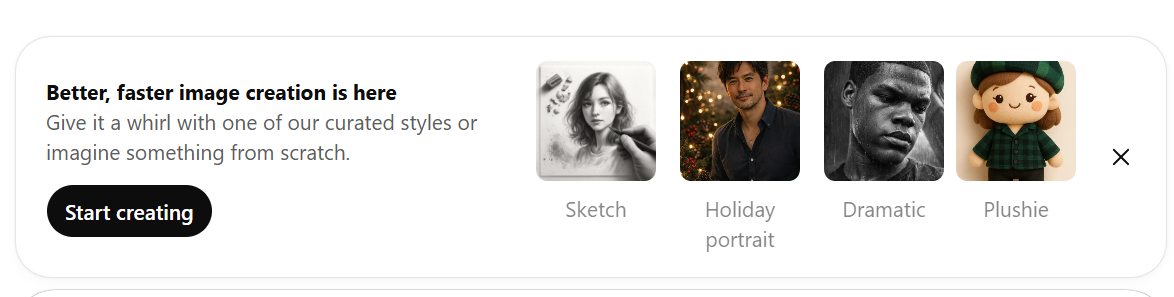
Below is a practical “what you get” definition for each preset category referenced in the OpenAI release and in the Images UI shown in your screenshots. Note: these presets are essentially pre-packaged prompt + style instructions powered by generative AI; the exact catalogue can rotate by region/account as OpenAI updates “trending prompts.” (OpenAI)
A) Preset “Creative transformations” shown in OpenAI’s announcement
OpenAI highlights preset styles/ideas that can change elements like text and layout, while preserving important details. (OpenAI) Once you're happy with your creation, you can download it.
Movie poster: Cinematic poster composition with dramatic lighting, title/credits layout, and era styling.
80s fitness instructor: Retro neon + VHS/film vibe, bold colour palette, stylised wardrobe, energetic composition.
Glam doll: High-polish doll/figurine aesthetic—smooth materials, stylised proportions, “collectible” look.
Ornament: Holiday ornament / decorative keepsake framing; glossy materials, seasonal lighting cues.
Fashion ad: Editorial, high-end brand photography composition; clean negative space for copy; premium lighting. Adobe Firefly offers innovative features for enhancing such designs.
Dress-up character: “Avatar wardrobe” workflow—outfits/accessories shift while face/pose is preserved.
Painting: Fine-art transformation (brush texture, painterly lighting, canvas feel) rather than photo-real. Adobe Firefly's capabilities can elevate this artistic process as well.
Drink ad: Commercial beverage ad layout—hero product, condensation highlights, “studio ad” composition.
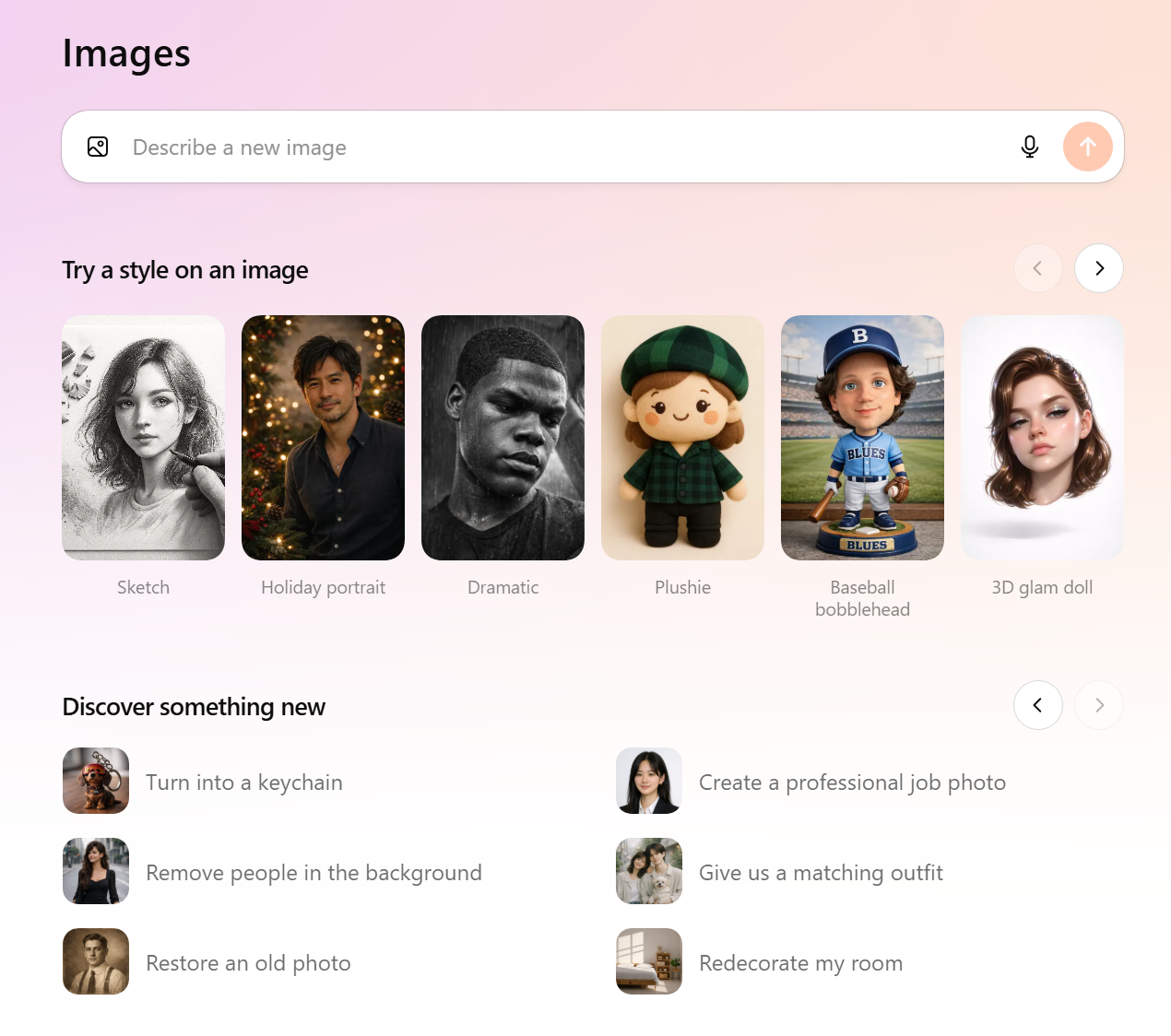
B) “Try a style on an image” presets shown in your screenshots
These are quick one-tap style transforms for uploaded images directly in your browser.
Sketch: Pencil/graphite drawing treatment; edge emphasis, hand shading, paper-like texture.
Holiday portrait: Warm seasonal portrait lighting, festive ambience (bokeh/seasonal grading).
Dramatic: High-contrast, moody editorial lighting; often deeper shadows and cinematic tone.
Plushie: Turns the subject into a fabric plush toy; simplified features and soft materials.
Baseball bobblehead: Collectible figurine look; oversized head, small rigid body, sports styling/backdrop.
3D glam doll: Similar to “Glam doll” concept—beauty-lit, polished 3D character render.
Doodle: Loose, playful line-drawing style; intentionally imperfect outlines.
Sugar cookie: “Iced cookie” craft aesthetic—baked texture + frosting details; novelty/merch vibe.
Fisheye: Ultra-wide / action-cam distortion; exaggerated perspective and curvature.
Pop art: Bold graphic poster style; punchy colours, halftone/comic cues.
Art school: Natural-light editorial portrait vibe; curated candid composition.
Inkwork: High-contrast ink illustration; brush/pen strokes, graphic shading.
C) “Discover something new” guided actions
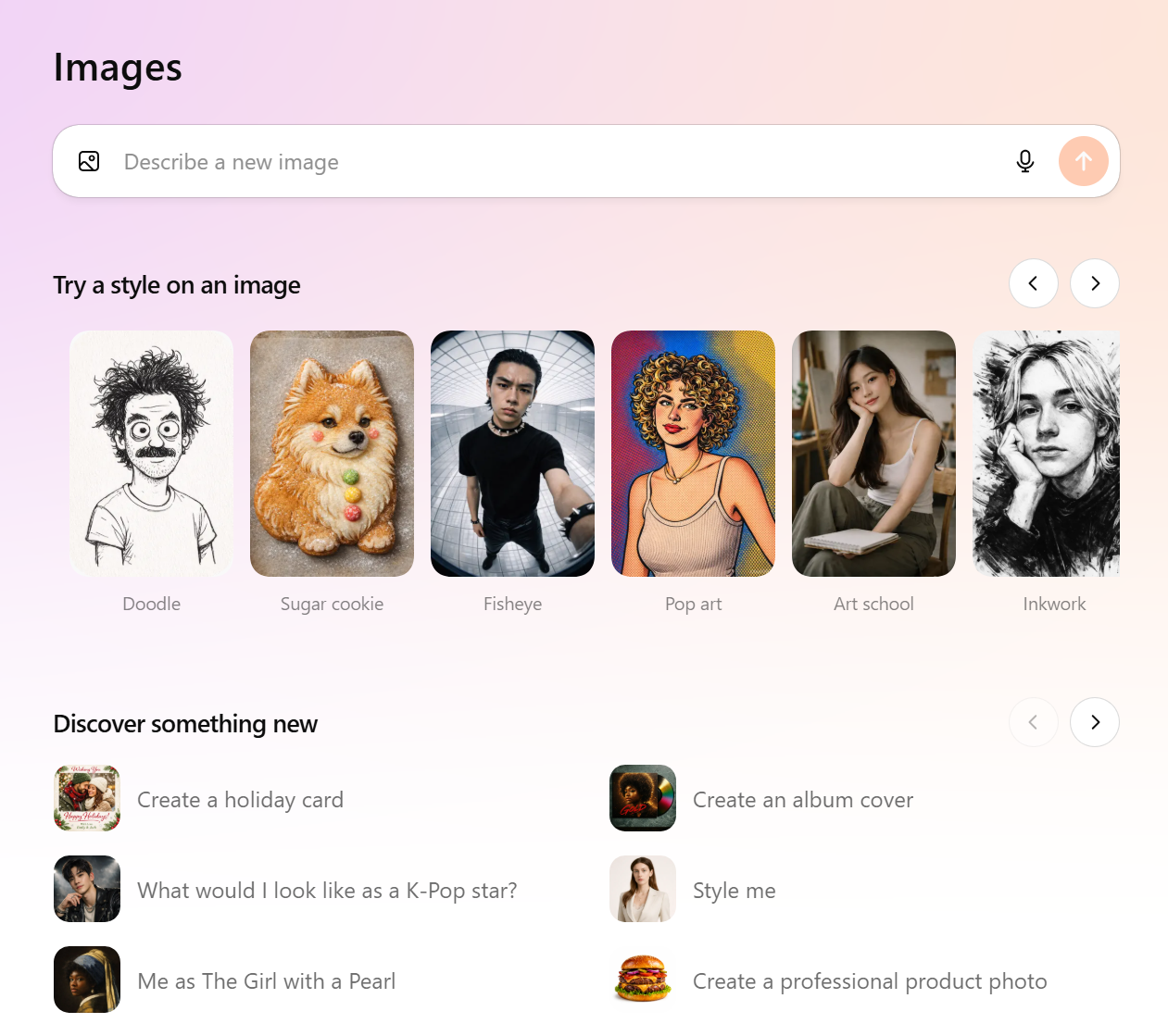
These are workflow shortcuts: you choose the task and the UI guides inputs/edits.
Turn into a keychain: Converts subject/object into a keychain-style 3D charm with ring/loop, providing an easy way to personalize your items.
Remove people in the background: Deletes background people and fills the scene naturally, offering an easy way to enhance your images without hassle.
Restore an old photo: Repair/clean-up workflow (clarity, noise reduction, colour correction). No hassle involved in this process.
Create a professional job photo: Studio-like headshot polish suitable for LinkedIn/CV with no hassle.
Give us a matching outfit: Outfit coordination so two people (or looks) match stylistically without hassle.
Redecorate my room: Interior visualisation; adds/replaces furniture while keeping perspective.
Create a holiday card: Greeting-card composition, seasonal layout, print-ready framing.
What would I look like as a K-Pop star?: Stylised makeover concept (wardrobe, styling, editorial lighting).
Me as The Girl with a Pearl: Classic painting-inspired transformation prompt preset in various styles.
Create an album cover: Album artwork composition; bold central concept; typography-ready layout.
Style me: General wardrobe/styling workflow (outfit swaps, vibe alignment).
Create a professional product photo: Clean studio product shot; controlled lighting; ecommerce-ready.
The 10 unexpected ways to use ChatGPT Images for growth
1) Build an “infinite A/B creative testing” product images engine for paid media
The new model is designed to make precise edits and preserve key details while you iterate, ensuring natural results. (OpenAI)
That enables a systematic A/B grid:
Keep product angle fixed; vary background context.
Keep layout fixed; vary headline/value prop.
2) Create AEO-first visual explainers that earn citations
OpenAI calls out improvements that make outputs more usable, including text rendering and instruction following. (OpenAI)
Use it for:
step-by-step diagrams,
comparison charts,
“how it works” visuals for SEO/AEO pages.
3) Turn one product image into a full catalogue
OpenAI explicitly positions GPT Image 1.5 as strong for ecommerce catalogue generation from a single image. (OpenAI)
This is huge for fast seasonal refreshes without a new shoot.
4) Make brand-safe edits without destroying identity, lighting, or composition
OpenAI's core promise here is “change only what you ask for,” keeping lighting/composition/appearance consistent. (OpenAI)
That's the difference between “AI art” and production usefulness.
5) Build a rapid “UGC-to-studio” pipeline
Take a real UGC photo, then:
remove clutter,
improve framing,
add a product hero composition,
generate multiple ad-ready variants.
You get speed without losing authenticity.
6) Produce sales enablement visuals at the speed of a deal cycle
B2B teams need visuals that explain:
before/after,
architecture,
ROI story.
With preset-driven layouts plus better instruction fidelity, you can ship draft-quality assets in hours (then polish with brand QA). (OpenAI)
7) Standardise team headshots for instant “brand maturity”
The “professional job photo” workflow is more than aesthetics—consistent headshots lift perceived credibility and improve employer branding.
8) Persona-specific localisation without rebuilding creative from scratch
Lock the visual identity, then localise:
setting,
wardrobe,
headline emphasis,
cultural cues.
OpenAI does warn results remain imperfect and multilingual is still a limitation in some cases—so validate before publishing. (OpenAI)
9) Create “promptable design systems” for repeatable brand output
Document prompt templates that preserve:
logo placement,
typography hierarchy,
colour tone,
product scale.
OpenAI explicitly notes improved preservation of branded logos/key visuals across edits. (OpenAI)
10) Use the new Images workspace as a team-wide adoption lever
OpenAI built a dedicated Images home with preset filters and trending prompts, updated regularly, to reduce friction and speed exploration. (OpenAI)
That matters operationally: it lets non-designers contribute to creative iteration without becoming prompt experts overnight.
Comparing top AI photo editors and design apps
When assessing the landscape of AI photo editors and apps, it's essential to understand the unique value each tool brings to the table. AI photo editors leverage advanced algorithms to enhance images, reducing the manual work typically associated with traditional editing. For instance, Adobe Photoshop remains the gold standard, offering comprehensive features that integrate AI-driven enhancements for professional-grade results. However, for users seeking simplicity, Pixlr stands out with its user-friendly interface and robust free offerings, making it an attractive option for quick edits without overwhelming complexity. Additionally, tools and apps like Lensa excel in mobile editing, providing effortless touch-ups and effects tailored for portraits and selfies. Ultimately, choosing the right AI photo editor and app boils down to understanding your specific needs, whether you prioritize intricate features or an easy-to-use experience that minimizes hassle while delivering impressive results.
| AI Photo Editor | Key Features | Ideal For |
|---|---|---|
| Adobe Photoshop | Full-featured image editing, advanced AI tools, deep layer and mask control | Professionals requiring maximum control and precision |
| Luminar Neo | AI-driven enhancements, smart relighting, automated photo corrections | Photographers focused on image quality and speed |
| Canva | Template-based design, integrated AI tools, drag-and-drop workflows | Marketers and teams creating fast, on-brand designs |
| Pixlr | Accessible browser-based editing, strong free tier, simple UI | Casual users seeking quick edits with minimal complexity |
| Lensa | AI portrait retouching, selfie enhancement, mobile-first effects | Mobile users focused on portraits and social content |
| Claid | Automated background removal, lighting correction, batch edits | E-commerce brands optimising product photography |
Overview of the best AI-powered photo editing tools
For those unfamiliar with the latest advancements in AI, this new image generation platform transforms creative workflows into streamlined experiences for creators. Utilizing intuitive prompts, users can produce high-resolution visuals for marketing materials or personal projects, catering to both casual users and professionals alike. The application's interface allows for ease of editing, ensuring brand consistency while minimizing manual work. By leveraging generative AI, teams can enhance their creative output effectively, showcasing their products in various styles and formats, paving the way for innovative marketing strategies.
OpenAI vs Gemini dynamics: The real competitive takeaway
Image generation for social media is now a distribution battleground. Google's Gemini has benefited from viral image-editing trends and rapid consumer adoption in certain cycles. (The Times of India)
OpenAI's counter is clear in the release:
speed (up to 4×) (OpenAI)
precision edits + preservation (OpenAI)
preset-first UX with trending prompts (OpenAI)
public, complex prompt examples that accelerate user competence and social sharing (OpenAI)
That last point is underappreciated: when you teach users how to drive the product well, you don't just improve satisfaction—you expand the addressable audience.
How I’d deploy this in a performance team this week
Pick one funnel (Meta prospecting, PDP images, SEO/AEO visuals, or Sales enablement).
Create a text prompt library (10 reusable templates).
Generate 30–60 variants, ship tests, document what works.
Standardise brand QA so outputs stay compliant.
With GPT Image 1.5's editing/preservation and lower iteration cost in the API, you can run creative like a growth discipline—not a design queue. (OpenAI)
Tips for generating high-quality AI images
Creating high-quality AI images and professional headshots doesn't have to be a daunting task. One easy way to enhance your results is to start with clear, specific prompts that detail what you're aiming for. The more information you provide—like the desired style, color palette, and elements to include—the better the AI can tailor its output to your vision. Additionally, leveraging a free AI image editor can help you refine your images post-generation, allowing you to make adjustments without the hassle of complex software. By combining precise prompts with effective editing tools, you can achieve stunning visuals that align with your brand's identity and objectives, all while saving time and resources.
GPT Images 1.5 FAQs
1) What is ChatGPT Images (new version)?
A new image generation and editing capability inside ChatGPT, powered by OpenAI's latest flagship image model and paired with a dedicated Images workspace. This innovative online tool allows users to create and modify images efficiently. OpenAI

2) What's the biggest improvement for marketers?
More reliable edits that preserve key details (lighting, composition, likeness) and faster iteration speed. The introduction of generative expand technologies helps enhance image quality. OpenAI+1
3) Can it generate images faster now?
OpenAI claims images can generate up to 4× faster, potentially saving you hundreds of dollars. OpenAI
4) Is text in images finally usable?
It's improved, including denser/smaller text, but you still need QA for accuracy. OpenAI
5) What is the “Images space” in ChatGPT?
A dedicated area in ChatGPT (sidebar on supported surfaces) with preset filters and prompts to speed up exploration, including the AI image editor features. OpenAI
6) What kinds of edits does it handle well?
OpenAI highlights adding, subtracting, combining, blending, and transposing elements while preserving what matters, using tools like Google Nano Banana Pro. OpenAI
7) What is GPT Image 1.5?
The API version of the upgraded model, positioned as stronger at preservation/editing than GPT Image 1, and optimised for marketing/ecommerce workflows. OpenAI
8) Is it cheaper in the API?
OpenAI states image inputs and outputs, including AI headshots, are 20% cheaper in GPT Image 1.5 vs GPT Image 1. OpenAI
9) Are there still limitations?
Yes. OpenAI notes results remain imperfect and limitations still exist across some scenarios. OpenAI
10) Should growth teams replace designers with this?
No. use it to accelerate ideation, testing, and production drafts; keep human creative direction and QA for brand safety and polish.
GPT Image 1.5 FAQs
Can I use ChatGPT Images commercially (ads, ecommerce, client work)?
Yes, in most cases you can use AI-generated or AI-edited images commercially, as long as you comply with the tool's terms, platform ad policies, and you have the rights to any source materials you upload on desktop (e.g., product photos, logos, models). For client work, treat it like stock/creative production: document inputs, maintain approvals, and ensure the output doesn't infringe third-party IP or mislead consumers.
Best practices
Use only assets you own/licence (product shots, brand logos, model releases).
Keep a lightweight “creative provenance” note: source image, prompt, date, operator, final usage.
Run policy checks per channel (Meta, Google, Amazon, TikTok) and per vertical (health/finance stricter).
If you're unsure about rights in a specific scenario, get legal review (especially for regulated claims or celebrity likeness).
Does ChatGPT Images preserve identity when editing photos?
It often preserves identity well for selfies and other small, constrained edits, but it can drift when you request major changes (style transfer, heavy retouching, different lighting, or face-related transformations). “Identity drift” typically shows up in facial geometry (jawline, eye spacing), skin texture, or age.
How to reduce identity drift
Use edit-only instructions: “Keep face structure, proportions, and identity unchanged.”
Change one variable at a time (outfit or background or lighting).
Provide constraints: “No facial beautification, no age change, no hairstyle change.”
Prefer “realistic photo edit” over “stylise” for identity-critical work.
If it drifts
Re-run with tighter constraints and fewer changes.
Use a stronger “do not change” block (see prompt structure below).
Try incremental edits (two or three small passes) instead of one big transformation.
If the use case requires strict identity fidelity (e.g., executive portraits), consider human retouching as the final pass.
How do I control brand consistency (logo placement, colours, typography)?
Brand consistency requires lock rules + templates + QA, not just prompts. AI is great at variation; your job is to constrain variation to what's acceptable by following easy steps to maintain that consistency.
What works reliably
Create a brand guardrail block you paste into every request:
Approved colour palette (HEX)
Font names (or “match existing typography exactly”)
Logo rules (clear space, min size, no distortion)
Tone (premium, minimal, bold, etc.)
Use a base template (master composition) and generate variations from it.
Anchor composition: “Keep layout, grid, margins, and logo placement identical. Only change X.”
Post-edit in design tools for typography/logos:
In practice, the most brand-safe workflow is: an AI art generator generates background/scene + designers place logo/type in Figma/Adobe/Canva.
Operational tip
Maintain a “Brand Creative Spec” one-pager and add it as a reusable prompt snippet for the team.
What are the safest workflows for product photography and ecommerce listings?
Safest means: truthful representation, consistent angles, accurate colours, and no deceptive enhancements. Ecommerce platforms and regulators care about misrepresentation (especially cosmetics, supplements, electronics, and “before/after” narratives).
Recommended workflow (brand-safe)
Start with your real product photo (your owned/licensed image).
Use AI to adjust environmental elements only:
Background clean-up, lighting balance, shadow refinement
Lifestyle scene context that doesn't change product features
Keep “hard truth” elements accurate:
Shape, size, labels, text on packaging, materials, ports, ingredients list, minimizing manual work
Do a side-by-side QA vs the original photo for your marketing materials.
For marketplaces (Amazon), follow category rules:
White background requirements where applicable
No misleading props that imply what's included
Avoid
Changing the product itself (dimensions, finish, packaging text).
“Feature invention” (extra attachments, claims, certifications).
Skin retouching that implies results beyond typical.
How do I avoid text rendering mistakes in compliance-sensitive creatives?
AI image models can still produce spelling errors, warped kerning, incorrect numbers, and subtle “near-miss” text—exactly the kind of thing compliance teams hate.
Best practice (simple rule):
Do not rely on AI to generate final compliance text in the image. This approach can go a long way. Generate the visual; apply final copy in a design tool.
If text must be in-image
Keep it short (3–6 words).
Use all-caps sparingly; avoid small font sizes.
Provide exact text in quotes and add: “Text must match exactly, no typos.”
Add a QA step: zoom to 200–300% and verify every character.
Compliance workflow
Visual generation → export → overlay copy/terms in Figma/Adobe/Canva → final proofread by a human → archive approved version.
What’s the difference between the ChatGPT Images UI and the GPT Image 1.5 API?
In practical terms:
ChatGPT Images UI
Best for: rapid ideation, conversational iteration, creative direction, and one-off edits.
Strengths: fast human feedback loop (“try again, slightly more…”) and easy reference-image editing.
Limits: less suited for automation, bulk generation, versioning, and programmatic QA, especially for casual users.
GPT Image 1.5 API
Best for: scale, automation, pipelines, bulk variants, integration into DAM/PIM workflows, and consistent parameterisation.
Strengths: reproducible generation at volume, easier A/B variant factories, and logging.
Limits: requires engineering setup and stricter prompt/asset management.
Rule of thumb
Use UI to discover the creative recipe and prompts.
Use the API to operationalise it at scale (variants, localisation, personalisation).
How do I create an A/B testing matrix for creative variants?
A good matrix isolates variables so you learn causality. Don't test 12 things at once.
A/B matrix template
Pick one primary variable per test:
Creative concept (lifestyle vs studio)
Hook/angle (speed vs quality vs trust)
Composition (close-up vs mid-shot)
Offer framing (discount vs bundle)
CTA style (direct vs curiosity)
Example 2×2
Axis 1: background (clean studio vs lifestyle kitchen)
Axis 2: angle (hero front vs 45° perspective)
\= 4 variants total
Execution best practices
Keep targeting, placement, budget, and landing page constant.
Define success metric upfront (CTR, CVR, CPA, MER, ROAS).
Run long enough to reduce noise; avoid “winner after 3 clicks.”
Archive prompt + seed + asset ID so you can recreate winners.
What’s the best prompt structure for “edit-only” requests?
Use a “constraints-first” format so the model understands what is non-negotiable.
Edit-only prompt structure (copy/paste)
Task
“Edit the provided image.”
Do-not-change constraints
“Do not change the subject's identity, facial features, body proportions, pose, or original lighting direction.”
Allowed changes
“Only change: [background] / [outfit] / [colour grading] / [remove objects].”
ai photo editor
“Photorealistic, natural shadows, consistent perspective, no plastic skin.”
Failure conditions
“If you cannot keep identity unchanged, revert and apply a lighter edit.”
Example
“Edit-only: keep the person identical. Only replace the background with a bright modern office. Preserve camera angle, lens look, and lighting. No face retouching.”
How do I handle IP/copyright style risks with image generation?
Treat AI-generated visuals, powered by artificial intelligence, like any creative asset: you are responsible for ensuring you're not infringing third-party rights.
Risk-reduction principles
Don't request “in the exact style of [living artist]” for commercial work.
Avoid using identifiable brand assets you don't own (logos, packaging, character IP).
Avoid celebrity likeness unless you have explicit permission/rights.
Prefer “generic descriptors” over named references:
“minimalist Scandinavian product photo” instead of “IKEA style”
“high-fashion editorial lighting” instead of “Vogue cover style”
Operational safeguards
Maintain a restricted prompt policy for client work (no trademarked characters, no living-artist style copying).
For high-value campaigns, do a quick legal/compliance check when there's any doubt.
What QA checklist should performance teams use before launching AI-generated creatives?
Here's a practical checklist you can operationalise in your workflow tool.
1) Brand & visual accuracy
Logo: correct version, not distorted, proper clear space
Colours: within approved palette; skin tones natural where relevant
Typography: consistent with brand rules (prefer applied in design tool)
2) Truthfulness & claims
Product shown matches the real product (shape, colour, packaging text)
No invented features, certifications, ingredients, results
Any claims have substantiation and required disclaimers
3) Compliance & policy
Platform policy check (Meta/Google/Amazon/TikTok)
Regulated vertical checks (health/finance) completed
No prohibited imagery (before/after, sensitive attributes targeting cues, etc.)
4) Technical quality
Resolution correct per placement
No artefacts: extra fingers, warped edges, broken reflections, unreadable microtext
Cropping safe areas respected (especially for Stories/Reels)
5) Text verification
If any text exists: spelling, numbers, pricing, dates, T&Cs verified at high zoom for high resolution images
Prefer overlaying final copy in a design tool
6) Measurement readiness
Naming convention + creative IDs set
Variant mapping to test matrix documented
UTM/URL parameters validated
Asset + prompt archived for reproducibility
7) Final approval
Two-person review (maker-checker)
Client approval (if applicable)
Archive approved master + working files
About Modi Elnadi
I'm Modi Elnadi, a London-based AI-first Growth & Performance Marketing leader and the founder of Integrated.Social. I help brands win in the new search landscape by combining PPC (Google Ads / Performance Max) with AI Search, SEO + AEO/GEO, and utilizing an AI headshot generator so you don't just rank on Google you show up in answer engines like ChatGPT, Gemini, and Perplexity when buyers ask high-intent questions.
If this article helped you, I'd genuinely love to connect. Reach out on LinkedIn (Modi Elnadi) with what you're building (or what's broken), and I'll share a practical angle on where you're likely leaving performance on the table, whether that's prompt-led content engineering, AI visibility, or paid media efficiency. If you reshare, please tag me and I'll jump into the comments.