
What Is SingleFile Phishing, and Why Does This Alert Matter?
SingleFile phishing means misusing a legitimate webpage-saving tool to help reproduce a trusted brand's appearance in a deceptive page. The danger is the impersonation, not the extension itself. A saved copy can look familiar while arriving from an untrusted attachment or a different domain. Check the real destination, verify the claimed sender independently, and never enter credentials into a login page supplied as an attachment.
Security alert, November 9, 2026: a convincing brand page is not proof that an enquiry, payment request or login prompt belongs to that brand. During a routine enquiry review, Integrated.Social observed saved-page markers on an uncorroborated lookalike website. We are not identifying the submitter or domain. The markers supported a copying assessment, but did not establish credential theft or the identity of an attacker.
The broader technique is not new. Trend Micro documented SingleFile misuse on April 4, 2019, including copied Stripe login pages. This article is a current practical warning about a long-documented risk, not an announcement of a newly discovered global campaign._
SingleFile Is Legitimate; a Copied Brand Page Is Not Identity Proof
SingleFile's official project describes an open-source extension that saves a complete webpage in one HTML file. Images, styles and other resources travel with that copy, allowing it to be viewed without the original site being live. That is useful for personal reference, research and retaining a page as it appeared when saved._
Those same visual-preservation features can be misused. An impersonator does not need to design a convincing brand page from scratch when an existing page's appearance can be reproduced. Familiar logos, navigation, product photography and typography can make an unfamiliar domain feel credible.
There is an important technical correction: the official SingleFile FAQ says scripts are removed by default. Normal archiving does not automatically add password-stealing behavior. Malicious modifications or other attack tooling are a separate matter. Uninstalling a legitimate archiving extension is therefore not a substitute for verifying who sent a file and where a page is hosted._
Trend Micro's 2019 report also explicitly separated abuse of the tool from the security of the extension and its users. The right response is to distrust an unverified delivery path, not to label every saved HTML page malicious.
How Copied Pages Become Phishing or Business-Impersonation Risks
A deceptive page may be hosted on a lookalike domain or delivered as an HTML attachment. Its appearance can support a fake invoice, a supposed partnership enquiry or a request to sign in. If an attacker changes the page to collect information or redirect the visitor, the resulting behavior is no longer simply an archived reference copy.
Not every suspicious brand enquiry immediately asks for a password. An initial exchange may instead build confidence before introducing a document, payment change or login request. That is why affiliation checks belong at the start of a commercial conversation, not only when an antivirus alert appears.
The same identity checks matter when a suspicious enquiry arrives through LinkedIn, email or a contact form. Familiar branding and a plausible job title are not independent verification. Our OpenAI TestFlight scam warning for advertisers explains why a convincing product invitation still needs scrutiny. For separate app-installation and consent decisions, read securing TestFlight and OAuth permissions against AI app impersonation. A copied login page, a beta invitation and an OAuth permission request are different risks, not interchangeable proof of an attack.
Keep credential phishing distinct from HTML smuggling. Microsoft's November 11, 2021 research describes specially crafted HTML that assembles a payload through browser-supported features. That is not a synonym for every copied webpage or every HTML attachment. Do not assume that opening any HTML file proves infection; do not assume that an attractive static page proves safety either._
Why “Base64 Bypasses Security Effortlessly” Is the Wrong Claim
Embedding assets can reduce the number of external resources a scanner sees. Encoding can also complicate some forms of inspection. But Base64 is an encoding format, not encryption or a universal security bypass.
Microsoft's research describes detections for suspicious scripts, obfuscation and HTML files that decode Base64. Modern defenses can inspect behavior as well as links. There is no evidence here for a claim that all gateways, antivirus products or browsers mistake SingleFile output for harmless content.
For a business buyer, the useful question is whether its actual email and endpoint controls handle the relevant attachment and impersonation risks, not whether a vendor uses the word “advanced.”
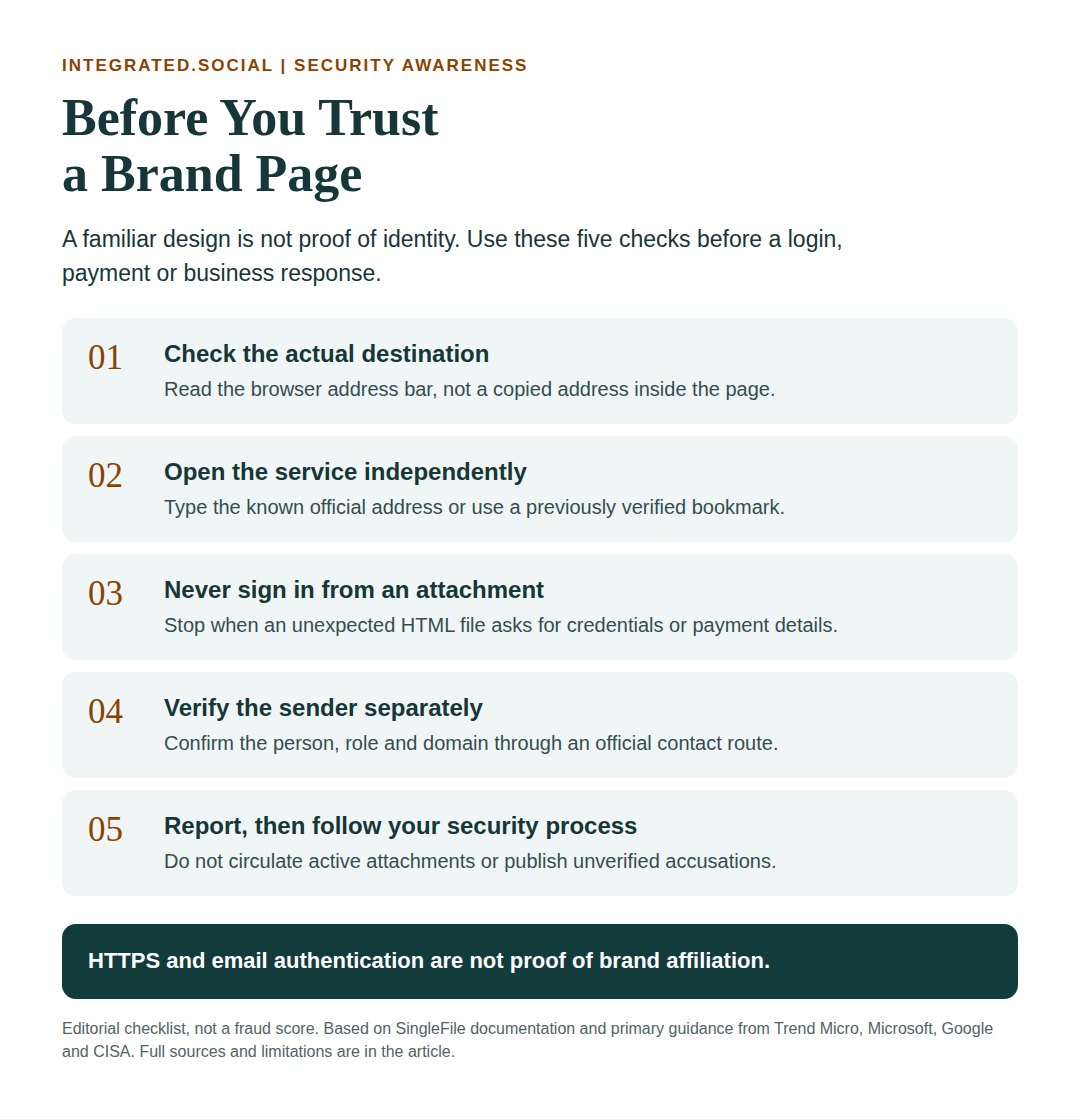
Five Checks Before You Trust a Brand Page or Enquiry
These checks are an editorial workflow, not a fraud score. One clue rarely establishes intent or identifies the person behind a message.
1. Check the Actual Destination, Not the Logo
If you are already viewing a page, inspect the browser's real address bar. Text that resembles an address inside the page can be copied. A local file may show a file:// path; a hosted copy may use HTTPS on a separate domain. Neither a local path nor HTTPS independently establishes whether content is malicious.
Use a known official address or a previously verified bookmark for login. Do not open a suspect attachment just to inspect its appearance. Search results can contain misleading results or ads, so cross-check the official brand-owner or company contact page rather than trusting the first familiar-looking result.
2. Never Sign In Through an Unexpected HTML Attachment
Treat unexpected .html and .htm files asking for credentials, payment details or account verification as a reason to stop. HTML has legitimate uses, so the extension alone is not proof of fraud. The dangerous combination is an untrusted delivery path and a sensitive action.
Google's phishing guidance recommends going directly to the service rather than providing information after a suspicious message link. A business process should not require employees to sign in through a standalone file emailed by an unknown contact._
3. Verify the Claimed Person Through an Independent Channel
Find the organization's official contact route independently. Confirm the person's role and the domain they are authorized to use. Do not rely only on a signature, a working mailbox, a copied website or a form notification.
A genuine platform notification confirms that your form relayed submitted details. It does not verify the visitor's employer. Equally, legitimate regional licensees or agencies may use a different domain, so a mismatch is a question to resolve, not an automatic accusation.
4. Understand What Email Authentication Can and Cannot Prove
SPF, DKIM and DMARC help authenticate sending domains and reduce direct spoofing. They do not certify the sender's business affiliation or make linked pages safe.
Microsoft's anti-phishing documentation explains that an attacker-controlled lookalike domain can pass these checks. Protect your real domain, but also investigate similar domains and misleading sender names. For a forwarded form alert, public DNS records are configuration evidence, not an observed authentication result for the visitor's original email._
5. Treat Saved-Page Markers and Domain Age as Supporting Clues
A trusted security analyst inspecting existing evidence as text may find a Page saved with SingleFile comment, an original URL or a saved-date string. These can support a copying assessment. They can also be edited or removed, and legitimate saved pages may contain them.
A recent registration date is not necessarily a domain's first-ever existence if older certificate records exist. Certificate history does not prove continuous ownership. Leave attachment inspection and evidence handling to an approved process rather than opening a suspicious file in your everyday browser.
Business Defenses: Combine Identity, Mail and Account Controls
A sensible defense combines employee judgment with enforced controls. Configure mail security to inspect attachments and impersonation signals; keep endpoint and browser protections current. Evaluate HTML handling with your security provider using approved test procedures, not live phishing samples or unsolicited documents.
Deploy aligned SPF, DKIM and DMARC through a staged configuration that preserves legitimate sending services. Have the email administrator review authentication reports before tightening enforcement. DMARC remains useful even though it cannot stop every separately registered lookalike domain.
Where supported, adopt phishing-resistant authentication such as passkeys or FIDO security keys. CISA distinguishes phishing-resistant MFA from ordinary MFA, and Google explains passkeys' site or app binding. One-time codes can still be phished. Passkeys do not solve every device, session or account-recovery risk.
For marketing teams, protect advertising accounts, shared inboxes and billing access with least privilege and an independent approval step for sensitive changes. Our Keeper password-manager review explains why vault protection, passkeys and account offboarding address different layers of risk. A password manager is not a replacement for identity verification._
AI-assisted lead triage should follow the same rule. A tool can summarize a page and flag inconsistencies, but a copied page's own statements are not independent evidence. Keep account access and commercial approvals under human control, as discussed in our AI governance quality-control guide._
What to Do If You Opened a File or Entered Credentials
If you merely received a suspicious message, use your mail service's reporting control and your organization's security process. Do not forward a potentially active attachment casually to colleagues. Preserve existing evidence according to company policy without publishing personal information.
If you opened a suspect file without entering information, stop interacting with it and contact your security team for assessment. Opening alone does not prove infection.
If you entered credentials or approved a suspicious login, contact your security team promptly. From a trusted device and the independently accessed official service, follow the relevant account-recovery process. A password change alone may not complete containment.
Microsoft's compromised-account guidance includes reviewing access, revoking sign-in sessions, checking registered authentication methods and consented applications, and removing unauthorized inbox rules or forwarding. Device compromise requires its own investigation; account recovery is not proof that the device is clean._
Report a suspected phishing URL through Google's official reporting guidance and the relevant registrar or hosting provider's abuse route. Browser warnings and provider suspension are different outcomes, and neither is guaranteed. Avoid unnecessary personal information and never publish an unverified accusation against the person whose name appeared in the message._
The Commercial Lesson: Verify Before You Accelerate
A promising budget, polished website or familiar brand name should not remove an identity check. Keep the first response proportional: verify affiliation, establish the proposed scope, then offer a meeting. Do not exchange account credentials, accept an unexpected login file or change payment details to speed up a sales conversation.
For the wider governance context, read our Five Eyes AI cybersecurity warning analysis. To discuss accountable marketing and agentic workflows, use Integrated.Social's Contact page or explore our agentic AI service. These are commercial workflow routes, not an incident-response service or a promise to detect phishing._